It's been a little over a month... I just wanted to have something new up.
I have been busy researching/deciding on a college (Any thoughts on RPI, UofRochester or SUNY Binghamton? please post in the comments!) and getting ready for APs in a couple weeks. Hopefully I will have more time in a few weeks.
While we are on the topic of colleges I thought I would share some links with you that I have found helpful. I should be back to my usual topics next time.
RateMyProfessors.com: Allows current students to rate their teachers on a variety of criteria. Unfortunately there aren't always that many reviews, but most professors have a few. Most of the above colleges have pretty mixed reviews (as can be expected) but I would think that if a college you are looking at has mostly bad reviews that might be pretty telling. RateAProf.com and PickAProf.com advertise similar things but have almost no reviews compared to RateMyProfessors
StudentsReview.com: Offers statistics, ratings and (most importantly) comments from current students and alumni. Like the above sites, there aren't too many reviews but I found there are enough to get some idea from the comments. The UI could use some improvement, however. Type your college in the search box on the top, and then choose it from the list of results. On the resulting page you should see a pie chart of students who would vs those who would not return. Under that chart click the link labeled "click here to find out why" to read the individual student comments.
FastWeb.com: Probably everyone already knows about FastWeb, but I think they are worth a mention anyway. FastWeb offers a scholarship search. All you have to do is fill out their incredibly long, tedious survey and you will be matched with scholarships (and banner ads). They also offer some mildly interesting articles from time to time. There are a huge number of other scholarship search engines as well, but despite all the advertising I have found FastWeb to be the most usable.
USNews: America's Best Colleges: Perhaps not as useful as the others, but It does give you an idea of how a given college stacks up to others in the US. They also have a scholarship search and other information.
CollegeBoard.com: The CollegeBoard publishes the SAT and AP tests, among others. Their website has all you need to know about their tests as well as some (basic) college comparison tools, a scholarship search engine and financial calculators. They also run the CSS profile required by some financial aid offices.
CommonApp.org: Home of the Common Application for US colleges. Fill out one form over the internet (or print and mail) to apply to a bunch of different colleges. Enough Said!
FAFSA: Online application for Federal Financial Aid.
Anyone have any other suggestions? Please comment!
Edit: Heading to RPI in the fall.
Saturday, April 28, 2007


Wednesday, March 14, 2007
Linux and the Samsung ML-2510
This post will probably only affect a small number of people, but it might be useful anyway (if only to remind me next time). Anyway, I found myself setting up a Samsung ML-2510 ( a cheap 25ppm b&w laser printer) on a Gentoo Linux machine yesterday, and was somewhat surprised to find that Samsung supports a good number of their printers and scanners on Linux with a unified driver kit available here (their website doesn't seem to work too well on firefox/flash9 for Linux). The driver comes with a fancy installer (just run the "autorun" binary after you extract it) which works perfectly except that, at least on Gentoo, it puts the cups filters in the wrong directory. So, the trick is to copy/symlink the contents of /usr/lib/cups/filter/ to /usr/libexec/cups/filter/
and adjust the port cups thinks the printer is connected to and things should work well. Good job Samsung for at least trying to provide support, a few of us do appreciate it! (Actually there are open source drivers for printers that speak Samsung's language as well, but I couldn't get them working easily).
If people are interested in a more detailed Linux printing help using CUPS, google around or check out LinuxPrinting.org
EDIT (4-10-07): Fixed model number typo.
RE: Commenter #1: Gentoo's cups start script is /etc/init.d/cupsd. I don't think the installer is necessarily broken, it is just not putting things in the correct places for Gentoo's setup (not sure if it is standardized or not). Another thing to try is to delete the printer the Samsung driver installer made for you (cups web interface) and re-do it using the usb device (/dev/usb/lp0 on my machine) that is associated with your printer instead of the default Samsung path (use the cups web interface: http://localhost:613). The official Samsung driver should be in the list of selectable drivers (I forget what it is under, should be obvious) when you add the new printer through the cups web interface. If you are still having trouble, feel free to email me or try asking on the Gentoo forums.
and adjust the port cups thinks the printer is connected to and things should work well. Good job Samsung for at least trying to provide support, a few of us do appreciate it! (Actually there are open source drivers for printers that speak Samsung's language as well, but I couldn't get them working easily).
If people are interested in a more detailed Linux printing help using CUPS, google around or check out LinuxPrinting.org
EDIT (4-10-07): Fixed model number typo.
RE: Commenter #1: Gentoo's cups start script is /etc/init.d/cupsd. I don't think the installer is necessarily broken, it is just not putting things in the correct places for Gentoo's setup (not sure if it is standardized or not). Another thing to try is to delete the printer the Samsung driver installer made for you (cups web interface) and re-do it using the usb device (/dev/usb/lp0 on my machine) that is associated with your printer instead of the default Samsung path (use the cups web interface: http://localhost:613). The official Samsung driver should be in the list of selectable drivers (I forget what it is under, should be obvious) when you add the new printer through the cups web interface. If you are still having trouble, feel free to email me or try asking on the Gentoo forums.
Sunday, March 11, 2007
Debian Package of the Day
Just a quick post to prove I'm alive ;-)
Apparently some Debian developers have started a "package of the day" project to help introduce people to some of the software available in the Debian repositories. I imagine this could be very useful to people just starting out using Linux (I'm sure there will be more of those, now that Vista is out). They also have a Ubuntu version but I'm not sure how much difference there is between the Debian and Ubuntu repositories anyway, so you might just want to keep track of both. (via ./)
Being a Gentoo user, I find that the Gentoo online package database is also very good for this. Either browse by category or check out what has been updated recently.
There are also some handy list of Windows programs and their open source/Linux equivalents, such as the one offered by the Linux Equivalent Project or this list (which seems a little out of date to me)
Apparently some Debian developers have started a "package of the day" project to help introduce people to some of the software available in the Debian repositories. I imagine this could be very useful to people just starting out using Linux (I'm sure there will be more of those, now that Vista is out). They also have a Ubuntu version but I'm not sure how much difference there is between the Debian and Ubuntu repositories anyway, so you might just want to keep track of both. (via ./)
Being a Gentoo user, I find that the Gentoo online package database is also very good for this. Either browse by category or check out what has been updated recently.
There are also some handy list of Windows programs and their open source/Linux equivalents, such as the one offered by the Linux Equivalent Project or this list (which seems a little out of date to me)
Sunday, February 25, 2007
Vista
So, you want to try Microsoft's latest and greatest? It seems like they still don't have all the bugs worked out yet, so read up before buying... Here are some links to get you started:
Tom's Hardware thread on Supported Hardware
Partial list of Vista Drivers (via /.)
Software Compatibility list (via dailycupoftech)
The Windows Vista Upgrade Advisor
The Microsoft TechNet Hardware Compatibility list (seems to be dead right now)
Tom's Hardware thread on Supported Hardware
Partial list of Vista Drivers (via /.)
Software Compatibility list (via dailycupoftech)
The Windows Vista Upgrade Advisor
The Microsoft TechNet Hardware Compatibility list (seems to be dead right now)
Friday, February 16, 2007
VLC
At last, time to post something exciting!
VLC is a free and open source media player with streaming and transcoding capabilities.
Besides being an easy way to play nearly any video format, VLC's streaming capability makes it really easy to stream a video from one computer to another over the network. For a dvd quality video, you should be able to get away with a 54Mbit wireless connection, maybe less. You will also need a reasonably fast computer hosting the video, particularly if you are transcoding it. If you have a decent, wireless Pocket PC that might make a good client computer to watch your video on. So, now you're wondering how...
Step 1: download and install VLC from www.videolan.org for whatever operating system(s) you are using. I will be using Windows and Linux for this tutorial, but the idea is basically the same whatever you do.
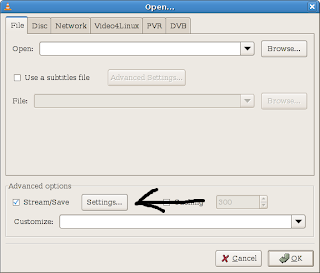
Step 2: Open whatever it is you want to play or stream using the options in the file menu. The dialog that comes up should be pretty self explanatory pick your media, and check the save/stream box near the bottom. Then click the settings button next to the stream checkbox.
The next dialog allows you to choose protocol and transcoding settings. I recommend you check the "play locally" box and the "udp" box, because the udp protocol seems to work well. In the address box next to udp enter the ip address of the computer you are streaming to (in windows you can find it by typing ipconfig in a command prompt). If your original file is already in a reasonably compressed format you can skip down to setting up the client. Otherwise you need to pick a codec to use for recompression (so you don't need as much bandwidth). If you have a fast enough CPU i find mpeg4 works well, even over slow networks. Check out the screenshot below for settings to get you started. Experiment to find a good trade off between quality, bandwidth consumption and cpu usage. The bitrates you use will depend on the size of the video you are streaming and the codec you use. Smaller bitrates need less bandwidth to stream, but are lower quality.
If you are streaming though a router of some sort, you may need to increase the time to live (ttl) value.
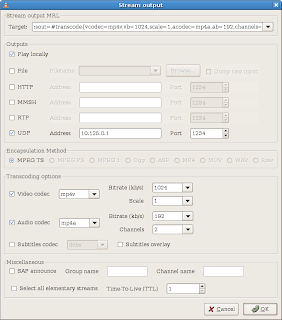
After you pick some settings you like, click ok to both dialogs. Your clip should begin to play.
On your client computer, open up VLC and choose open network stream. Assuming you are following along with this tutorial, choose UDP/RTP and leave everything else at the default settings. Click OK and your video should start streaming.
I have simplified this process quite a bit. VLC is really quite powerful so I would recommend you look through the documentation on videolan.org or google it for some more tutorials. Hopefully everything made sense. Try it between two computers first, then experiment with any mobile devices you may have. If you have a something on your tv that can support streaming video, chances are VLC can stream to it. You will just need to setup the correct format and protocol.
Have fun, and feel free to leave questions in the comments.
VLC is a free and open source media player with streaming and transcoding capabilities.
Besides being an easy way to play nearly any video format, VLC's streaming capability makes it really easy to stream a video from one computer to another over the network. For a dvd quality video, you should be able to get away with a 54Mbit wireless connection, maybe less. You will also need a reasonably fast computer hosting the video, particularly if you are transcoding it. If you have a decent, wireless Pocket PC that might make a good client computer to watch your video on. So, now you're wondering how...
Step 1: download and install VLC from www.videolan.org for whatever operating system(s) you are using. I will be using Windows and Linux for this tutorial, but the idea is basically the same whatever you do.
Step 2: Open whatever it is you want to play or stream using the options in the file menu. The dialog that comes up should be pretty self explanatory pick your media, and check the save/stream box near the bottom. Then click the settings button next to the stream checkbox.

The next dialog allows you to choose protocol and transcoding settings. I recommend you check the "play locally" box and the "udp" box, because the udp protocol seems to work well. In the address box next to udp enter the ip address of the computer you are streaming to (in windows you can find it by typing ipconfig in a command prompt). If your original file is already in a reasonably compressed format you can skip down to setting up the client. Otherwise you need to pick a codec to use for recompression (so you don't need as much bandwidth). If you have a fast enough CPU i find mpeg4 works well, even over slow networks. Check out the screenshot below for settings to get you started. Experiment to find a good trade off between quality, bandwidth consumption and cpu usage. The bitrates you use will depend on the size of the video you are streaming and the codec you use. Smaller bitrates need less bandwidth to stream, but are lower quality.
If you are streaming though a router of some sort, you may need to increase the time to live (ttl) value.

After you pick some settings you like, click ok to both dialogs. Your clip should begin to play.
On your client computer, open up VLC and choose open network stream. Assuming you are following along with this tutorial, choose UDP/RTP and leave everything else at the default settings. Click OK and your video should start streaming.
I have simplified this process quite a bit. VLC is really quite powerful so I would recommend you look through the documentation on videolan.org or google it for some more tutorials. Hopefully everything made sense. Try it between two computers first, then experiment with any mobile devices you may have. If you have a something on your tv that can support streaming video, chances are VLC can stream to it. You will just need to setup the correct format and protocol.
Have fun, and feel free to leave questions in the comments.
Wednesday, February 14, 2007
Gmail for all!
Well except those in the UK, GoogleMail for you ;-)
Google has made it possible to sign up for a Gmail account without having to use a cell phone or get an invite. All you have to do is go to Gmail.com and click sign up. Highly recommended, the UI is great once you get used to it, and if you don't like it you can always use a pop3 client. If for no other reason, you can't beat a 2+ gb mail account for free (well maybe, but Gmail is still better)
You can also add Encryption and various other features using Greasemonkey scripts.
Read the Official Announcement here! and don't for get to check out the hilarious video.
Only one question though: what do I do with my remaining 68 invites?
Google has made it possible to sign up for a Gmail account without having to use a cell phone or get an invite. All you have to do is go to Gmail.com and click sign up. Highly recommended, the UI is great once you get used to it, and if you don't like it you can always use a pop3 client. If for no other reason, you can't beat a 2+ gb mail account for free (well maybe, but Gmail is still better)
You can also add Encryption and various other features using Greasemonkey scripts.
Read the Official Announcement here! and don't for get to check out the hilarious video.
Only one question though: what do I do with my remaining 68 invites?
Monday, February 12, 2007
Long time, No post
Sorry that I haven't been posting lately. I have been very busy with school and other things. This is just a quick post to let you know that I should be back this weekend if not before.
Wednesday, January 31, 2007
Free Commercial Software, Update on Online Courses
First off, I would like to thank whoever just commented on my AP Courses post, pointing out www.courserepository.org which has a bunch more free material for a variety of online classes. If anyone else has any other similar sites they like I would love to hear about them, please comment on my original post.
Second, I have been reading a lot about a new site called Giveaway of the Day over the last couple weeks. Giveaway of the Day gives away a free commercial software package every day (fully licensed) . I'm really not sure how the economics of this are supposed to work, but they do occasionally give away interesting software. There is also a Game specific page. You can read a little more about it here, but I'm still not sure what the catch is. It at least might be worth looking into. I'll let you know how it works if I ever happen to notice they have something I want while it's still free.
Second, I have been reading a lot about a new site called Giveaway of the Day over the last couple weeks. Giveaway of the Day gives away a free commercial software package every day (fully licensed) . I'm really not sure how the economics of this are supposed to work, but they do occasionally give away interesting software. There is also a Game specific page. You can read a little more about it here, but I'm still not sure what the catch is. It at least might be worth looking into. I'll let you know how it works if I ever happen to notice they have something I want while it's still free.
Sunday, January 28, 2007
Windows based Debian Installer
For people who have been wanting to try to install Linux for awhile but haven't known how to start or don't have a bootable CD drive, etc Debian has a Windows based installer. All you have to do is go to goodby-microsoft.com and run the Windows executable. The installer then downloads what you need and sets you up with the main Debian installer. Apparently, there is also a similar program for Ubuntu.
I haven't tried either of these yet, but it seems like a good idea. Great for an old Windows machine without a CD burner (last time I checked a Debian disc set was a couple DVDs or half a dozen CDs).
I would recommend you start with knoppix or some other livecd (Internet Freedom Disc if you prefer) first, to get used to Linux though.
I haven't tried either of these yet, but it seems like a good idea. Great for an old Windows machine without a CD burner (last time I checked a Debian disc set was a couple DVDs or half a dozen CDs).
I would recommend you start with knoppix or some other livecd (Internet Freedom Disc if you prefer) first, to get used to Linux though.
Monday, January 22, 2007
Misc. News
I don't have too much for you tonight, just a couple news items.
First off: Gaim2-beta6 is out Get it here. The Xfire plugin has also been updated.
Lifehacker linked an excellent looking book that teaches the open source 3D drawing/animation program Blender (mentioned here a number of times). I used an older version to learn the basics quite awhile ago and it was fairly well written. Get the book here. (pdf here)
A couple weeks ago, Daily Cup of Tech released a tool kit for fixing Windows computers that fits on a 32M flash drive. Might be handy. UBCD is also great for doing repairs.
First off: Gaim2-beta6 is out Get it here. The Xfire plugin has also been updated.
Lifehacker linked an excellent looking book that teaches the open source 3D drawing/animation program Blender (mentioned here a number of times). I used an older version to learn the basics quite awhile ago and it was fairly well written. Get the book here. (pdf here)
A couple weeks ago, Daily Cup of Tech released a tool kit for fixing Windows computers that fits on a 32M flash drive. Might be handy. UBCD is also great for doing repairs.
Subscribe to:
Posts (Atom)


